Key Highlights:
- Google updates AI Mode in Chrome to reduce tab hopping by opening links side-by-side with the AI interface.
- Users can read pages, ask follow-up questions, and compare information without losing context.
- AI Mode in Chrome now also supports multi-tab context, allowing tabs, images, and PDFs to be combined into a single query.
- The updated AI Mode experience in Chrome is rolling out in the U.S., with broader availability expected later.
It’s been quite a while since Google has integrated AI Mode in Chrome. Until now, looking for extra information by clicking links provided by AI Mode felt like a constant jump between tabs. Google understands this and has announced an update to AI Mode in Chrome, which should fix your tab hopping game.
Google fixes the tab-hopping issue when using AI Mode in Chrome
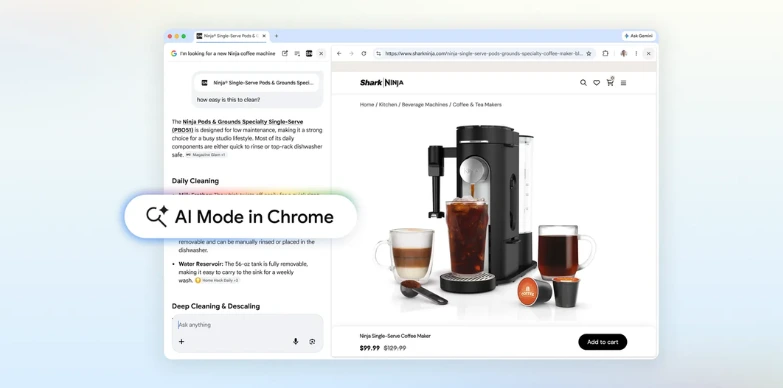
As part of the latest update to AI Mode in Chrome, clicking on a search result now opens the webpage side-by-side with the AI interface, instead of replacing it. This allows you to read a page, ask follow-up questions, and compare information without losing context. Google says it wants to keep everything in one place while still allowing you to explore a topic using AI.
Google, giving an example, notes that if you’re looking for a specific product, you can simply open a retailer’s page next to AI Mode and ask questions about it in real time. The AI then pulls context both from the page and across the web to respond accordingly. Similarly, while reading about a topic, you can continue asking questions without jumping back and forth between tabs.
Google says that during the testing period, users found the new approach more focused, especially when dealing with long articles or videos.
Also read: Google Search Now Lets You Jump into AI Mode from AI Overviews Using Follow-Up Questions
Google adds multi-tab context to AI-powered search
Speaking of changes, Google is also expanding how AI Mode handles context. You can now add multiple open tabs into a single query using a new “plus” menu inside the search interface. This allows AI Mode to understand what you are already browsing and generate responses based on that combined context. You can mix tabs, images, and even files like PDFs into one query.
For example, if you are researching hiking trails, going forward, you can now include several open pages and ask for similar recommendations. Additionally, students can combine lecture notes, slides, and documents to get more custom explanations. Last but not least, you can now access some powerful tools in AI Mode, like Canvas or image creation, wherever you see the new plus menu in Chrome.
As of now, the updated AI Mode features are rolling out in the United States, with wider availability expected later down the line.