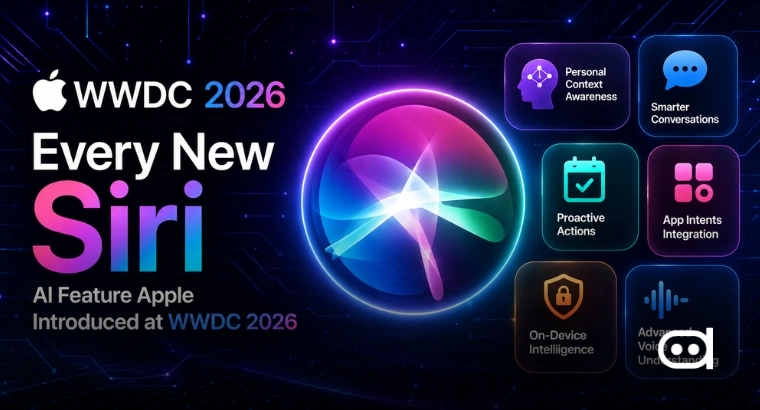
- Apple launched Siri AI at WWDC 2026, an all-new version of Siri powered by next-generation Apple Intelligence.
- Now Siri actually understands personal context, knows what’s happening on screen, handles different types of input, and works more deeply across Apple’s devices.
- Besides Siri AI, Apple also rolled out new parental controls, stronger Screen Time, performance boosts, photorealistic image generation, smarter ways to communicate, and more features, most arriving this fall.
Apple’s AI vision took center stage at WWDC 2026 when the company revealed Siri AI, a totally new take on Siri built with next-gen Apple Intelligence. This is Apple’s boldest move with its assistant yet. Siri is no longer just a voice helper; it’s now a fully integrated AI that understands your context, can read content on screen, and works across different apps.
The launch was accompanied by a wide range of Apple Intelligence-powered features across the company’s software ecosystem like image editing, browsing, scheduling, home management, accessibility; but they’ve kept privacy front and center with on-device processing and Private Cloud Compute.
Apple’s Siri AI is It’s ‘Biggest Assistant Upgrade’ Yet
Siri AI is Apple’s fully reimagined assistant, built with their next-gen Intelligence. Apple says it’s smarter, more capable, more helpful than ever with precise answers and conversations that feel natural.
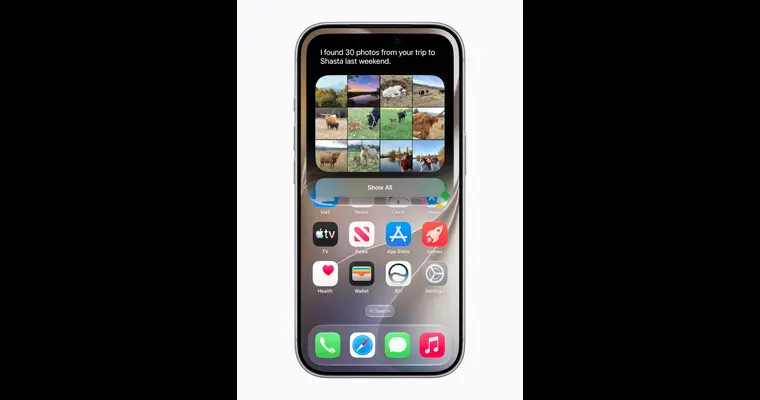
A standout feature presented was the it’s ability to reference personal context. Siri AI can search through your messages, emails, photos, and more to find what you need and when you need it. You can ask Siri about a restaurant tip mentioned in Messages, or to track down a hotel confirmation in your old email. Siri AI also lets you do more actions across your apps: start emails, edit and share photos, complete tasks without jumping between apps.
The next generation of Apple Intelligence powers an entirely new Siri: making the apps and experiences you rely on across iPhone, iPad, Mac, and Apple Vision Pro more personal and helpful than ever. pic.twitter.com/aXiDIkqAKn
— Tim Cook (@tim_cook) June 8, 2026
For bigger questions, Siri AI pulls fresh information from the web and builds helpful answers. Users can ask about events, locations, or any topic and keep following up in the same conversation.
Apple also launched a dedicated Siri app, so you can look back at past conversations or start new ones. Chats sync privately across devices with iCloud, so you can pick up where you left off on Mac, iPhone, iPad, Apple Watch, or Apple Vision Pro.

This new Siri AI is deeply integrated everywhere across Apple. On iPhone, you can trigger Siri with “Hey Siri,” the side button, or by swiping down from Dynamic Island. On iPad and Mac, it’s incorporated into Spotlight and context menus, you are able to ask about images, files, or text directly on your screen. Apple Vision Pro gets a special spatial Siri with a 3D visualization you can place anywhere. Siri AI is also accessible with Apple Watch, CarPlay, AirPods, and more.
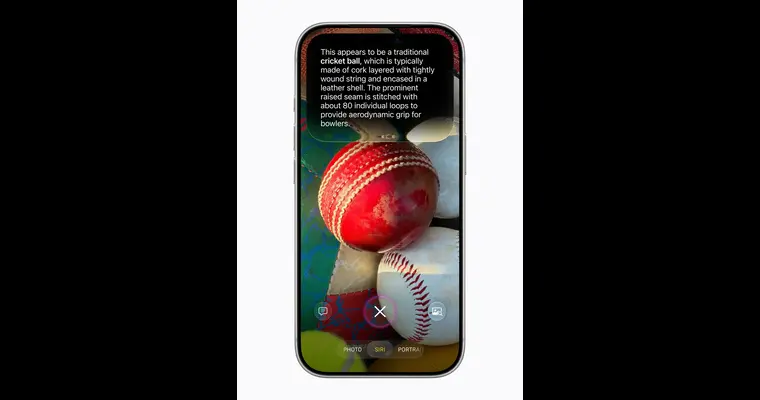
Siri AI now understands images, too. In the iPhone’s Camera app, Siri mode lets you ask questions about what you see, Siri can explain visual content and take action depending on what’s in front of the camera. “Visual Intelligence with Siri” is also moving to iPad, Mac, and Vision Pro. On iPad, it’s part of screenshots; on Mac, you can use a shortcut to ask questions about selected screen content.
Writing ToolsApple Siri AI on Vision Pro are now part of Siri AI. You can draft from scratch, polish text, and ask Siri to make edits, all in simple language. In Mail and Messages, Siri picks up on your unique communication style with contacts, including their preferred tone and punctuation style. Siri also proofreads automatically across most apps, even third-party ones.
In a demonstration, the tech giant showcased Siri AI grabbing a friend’s address from an old text and adding it as a stop in Maps, turning a casual conversation about concert ticket lotteries into reminders, finding locations from images, and organizing photos into shared albums without making users switch between apps.
Another big feature is onscreen awareness. Siri AI can answer questions about whatever’s showing on your screen. Apple showed off how you can get a potluck invite, ask Siri for ideas on what to bring, and drop a recipe straight into Notes.
Early reviews of Apple’s Siri AI announcement are notably positive especially compared to previous updates. Commentators are calling it the most ambitious overhaul of Apple’s assistant in years. Most of the excitement comes from Apple’s demos, where Siri AI pulls information from Messages, Photos, Notes, and Calendar, then uses that data to get things done across different apps.
Other AI Features, Improvements Coming to Apple Devices
Apple also rolled out a few major features at WWDC 2026 apart from Siri AI. Here’s what we know about them:
1. New Parental Controls and Screen Time Updates
Apple rolled out stronger tools for parents to manage what kids can see, who they talk to, and when apps are available. Child accounts come with age protections, and Setup Assistant helps parents choose allowed apps. Communication Safety now lets parents approve new contacts and auto-intervenes if someone shares explicit or violent content. Screen Time got serious upgrades like daily limits for Entertainment, Games, and Social Media. Parents can schedule app access during the day, plus there’s a new design that gives a better view of device usage and top apps.
2. More Responsive, Reliable, and Smoother Experiences Across Software Platforms
iPhone and iPad apps launch up to 30% quicker, photos load 70% faster, AirDrop’s 80% faster. Moving between cellular and Wi-Fi is more seamless, and transferring files with iPad is up to 5x faster. Search in Spotlight, Photos, and Mail has been rebuilt for stability and speed.
3. Frame-Worthy Compositions with New Ways to Edit Photos
Photos app got new AI-powered editing tools. Spatial Reframing lets you change the photo’s composition after the shot, dragging a photo and previewing perspective shifts in real time. Apple Intelligence only generates what’s needed to keep the original look. The Extend tool expands images, straightens horizons, tweaks aspect ratios, and adds more space around subjects without cropping away important bits. The Clean Up tool is upgraded to remove distractions more naturally and with higher quality. Photos edited with Apple Intelligence have a hidden SynthID watermark.
4. Smarter Safari and Password Upgrades
Safari features new AI browsing tools. Tabs auto-organize into topics, cleaning up a large number of open pages. As you add tabs, Safari puts them into topics or makes new ones. Notify Me monitors webpages like watching for product restocks or price drops, then sends a notification when something changes. The Passwords app auto-upgrades accounts to strong passwords. It can securely log into websites and update passwords for you. Describe an Extension lets you create custom Safari extensions just by telling Safari what you want.
5. Photo-Realistic Images With Image Playground
Image Playground now supports photorealistic image creation. Users can make high-quality images in many styles using a generative model on Private Cloud Compute. Every AI-generated image has a hidden SynthID watermark. You can tweak images with natural language or pick objects to move, resize, or adjust. Make images for Messages, Lock Screen, websites, flyers and choose different aspect ratios as needed.
6. Smarter Communication and Scheduling Tools
Messages now suggests actions in one tap based on chat context. You can get reminders, notes, and more, directly from conversations. Messages helps find photos by recognizing keywords, places, people. Mail has smarter suggestions that take action in other apps, while Smart Reply adapts to your writing style. Phone app now offers Call Context, surfacing information like reservation codes when calling businesses. Calendar can create or update events just by describing them.
7. Easier Shortcuts Automation
Apple is making automation simpler with Describe a Shortcut. Just say what you need in simple language; Shortcuts builds the steps for you. You can ask for changes with more descriptions, no manual edits. Apple showed examples like automating alarms, productivity, and smart home actions.
8. Smart Capabilities in the Home App
The Home app now groups accessory notifications into single activities so you get one update. HomeKit Secure Video offers AI-generated summaries across clips. You can search footage and quickly spot highlights.
9. Stronger Accessibility Features
VoiceOver now offers richer image descriptions and more robust Live Recognition. Press the Action button on the iPhone and ask about your surroundings, get detailed answers. Magnifier offers new exploration tools with high contrast. Voice Control lets you describe onscreen controls you want, instead of memorizing exact labels. Accessibility Reader supports complex content and delivers summaries or translations when needed.
Credits: Craig’s Tech Talk
Additional New Features and Features Coming This Fall
Apart from all these will announce more Apple Intelligence features across its products:
- Workout Buddy adds Spanish support, deeper fitness insights, and standalone Apple Watch capability.
- iPhone will have smart file and folder naming based on its contents.
- Genmoji is improved; you can describe changes you want.
- iCloud shared albums with full-resolution sharing
- Menopause and perimenopause tracking in Health’s Cycle Tracking
- Dynamic app grid
- Reworked Find My app on Apple Watch
- Custom EQ for AirPods
- Expanded GymKit
- Spatial scene upgrades for Vision Pro, and
- Enhanced Flyover in Maps.
All these run on next-gen Apple Foundation Models, on-device and on Private Cloud Compute privacy is at the core, keeping your info safe.
Also read: Why Does WWDC 2026 Feel Like Apple AI’s Scrutiny?
WWDC 2026 brought a major shift for Apple Intelligence, putting Siri AI at the core of Apple’s future AI plans. The assistant now combines context understanding, multimodal input, systemwide actions, web knowledge, and integrated writing tools, all across Apple’s ecosystem.
At the same time, Apple is incorporating Intelligence deep into every app and platform; from Photos and Safari to Messages and Home, Accessibility and Shortcuts. The latest moves show AI is becoming fundamental while privacy is prioritized through on-device work and Private Cloud Compute.